UnitVR — VR arcade management software

The floor comes alive no one waits

Every headset in your venue on one tablet: game launch, session timer, live view for the room and revenue — no stopwatch, no running between headsets.

7 daysfree trial access
up to 20headsets on the trial
Pico · Questsupported headsets
Scroll — we'll show how it all connects
01Pico and Meta headsets
02Session timer
03Live view on the TV
04Game catalog
05Venue analytics
06Android · Windows · Apple
01 What it looks like

The whole floor on one screen

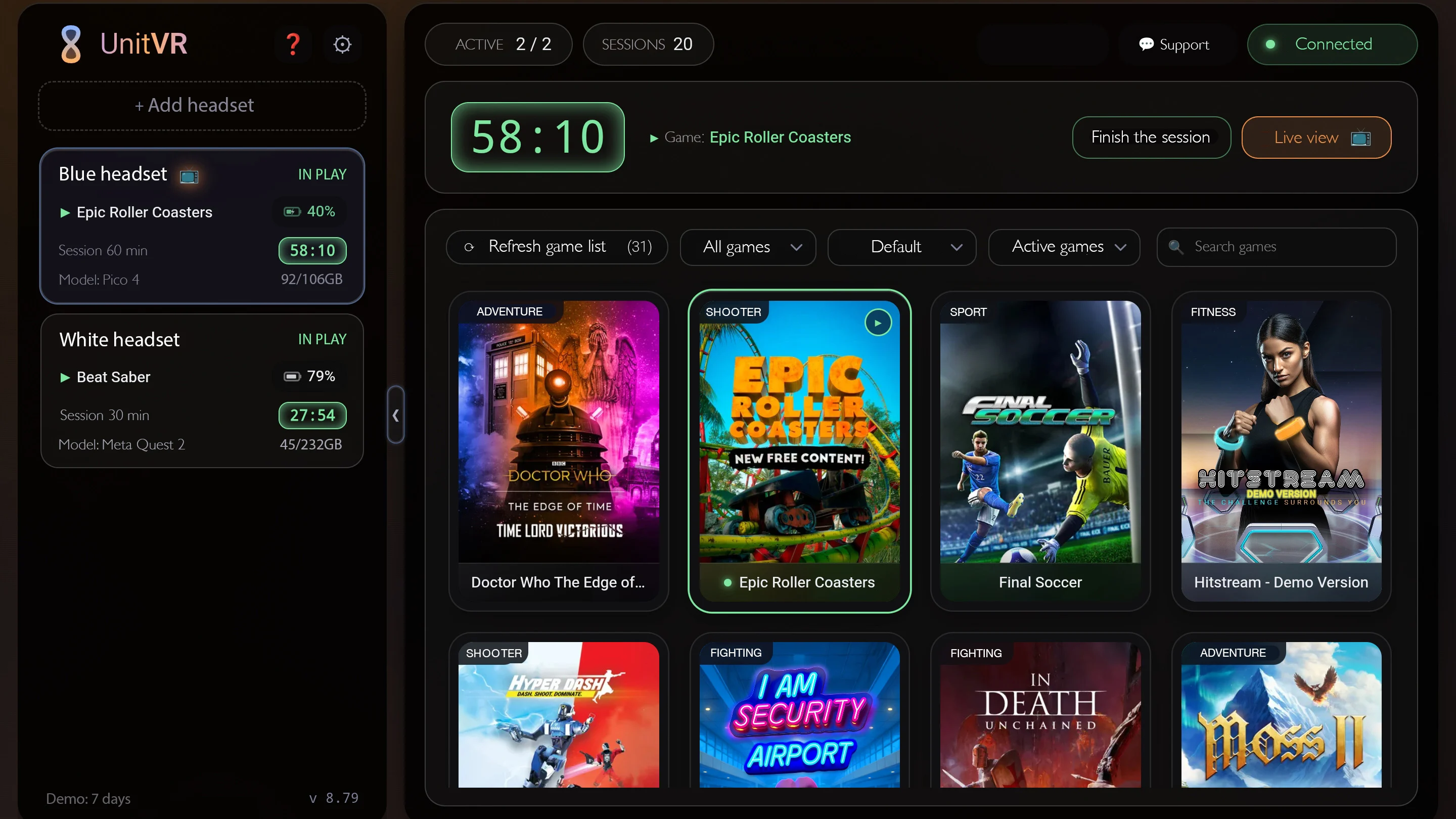
The operator panel runs in a browser on a tablet, laptop or desktop. Your headsets on the left, the session timer and game library on the right. Hover over the hints.

UnitVR operator panel
Session timer

Ends on its own when the paid time is up

Every headset's status

In game, paused, battery, storage — all visible without walking over

Game library

Collected from the headsets automatically; launch with one tap

Live view

On the operator's tablet and the TV in the room

02 Features

Everything the floor needs in one window

The base plan covers running the venue end to end. Add-ons are switched on separately — only the ones you need.

01

Floor management Operator panel

Live status of every headset, game launch and session timer in two taps. The session ends on its own when the paid time runs out.

Headset statusTimerGame launch
02

No play without payment Headset lock

Until a session starts, games won't launch and the guest can't wander into the menu. For emergencies there's an override code, logged every time.

LockOverride codeLog
03

Live view Add-on

The headset view on the operator's tablet and the room TV within 3–5 seconds. One TV can show several headsets.

TabletTVTimer overlay
04

Game catalog Add-on

Your whole library with cover art, genres, descriptions and trailers — guests pick for themselves.

Cover artTrailersGenres
05

Analytics and shifts Advanced dashboard

Revenue, average ticket, load by hour and day of the week, reports for every headset and every operator.

RevenueLoadShifts
03 Before and after

A shift at the venue: before and after UnitVR

Without UnitVR
Time is tracked on a phone
Guests play over — money never reaches the till
The operator walks to the headset to start a game
A guest quits the game and browses the headset menu
Revenue is added up by hand at closing
With UnitVR
The session ends on its own when time is up
No payment — no games on the headset
Games launch from the tablet in one tap
The headset menu is locked
Revenue and sessions are counted automatically
‹›

Drag the divider — or use the arrow keys.

04 Calculator

What a venue loses without control of time

Move the sliders — the estimate updates instantly.

A rough estimate: overplayed minutes are counted as missed sessions at the same price. 30 working days a month. Figures are in US dollars; the UnitVR plan is $13 per headset per month, paid in USDT.

$3,360
slips past the till every month
23.3%of revenue goes to overplayed time
$14,400venue revenue per month
$40,320lost per year
168 hhours overplayed per month
336sessions missed per month
05 Getting started

From sign-up to the first session

No technician visit needed — just follow the setup wizard in your account.

01account

Sign up

Create an account and a venue — the 7-day trial starts right away.

02headset

The app

Install UnitVR on the headset from a computer with SideQuest — once; after that it updates itself.

03tablet

Pairing

The headset shows a code — enter it on the operator's tablet.

04account

Rates

Set session lengths and prices — the tablet picks them up automatically.

05floor

First session

Pick a headset and a game, tap “Start” — the timer is running.

06 Why we do this

A venue is about experiences

We've worked with VR since 2020 and watched venues lose money on small things: a forgotten timer, a guest in the headset menu, a queue with nothing to watch. UnitVR takes that routine off your hands operators look after guests, and the owner sees the floor from anywhere.

07 Records

CRM for a VR arcade: sessions, shifts and revenue

CRM for a VR arcade is not a contact card index — it is a record of what actually earns: every session, with its rate, its time and the games launched, is written down automatically, without a notebook or a spreadsheet at closing. The operator looks after guests; the data collects itself.

In the owner account that becomes revenue for the day and for any period, average ticket, load by day and hour, a report per headset and an export of every session to Excel — for the till and for your accountant. A separate section lists where revenue usually leaks: time typed in by hand, zero-price sessions, sessions cut short and emergency unlocks.

People are in the system too: operators are added with a PIN, a shift is opened on the tablet, and each session is credited to whoever ran it. The report per person shows revenue, hours on shift and session count. An evening summary and alerts arrive in Telegram, and several venues are run from one account.

Try it 7 days free

Every feature and every add-on, up to 20 headsets, no card required. The paid plan is switched on manually — nothing is ever charged automatically.

Then $13 per headset per month